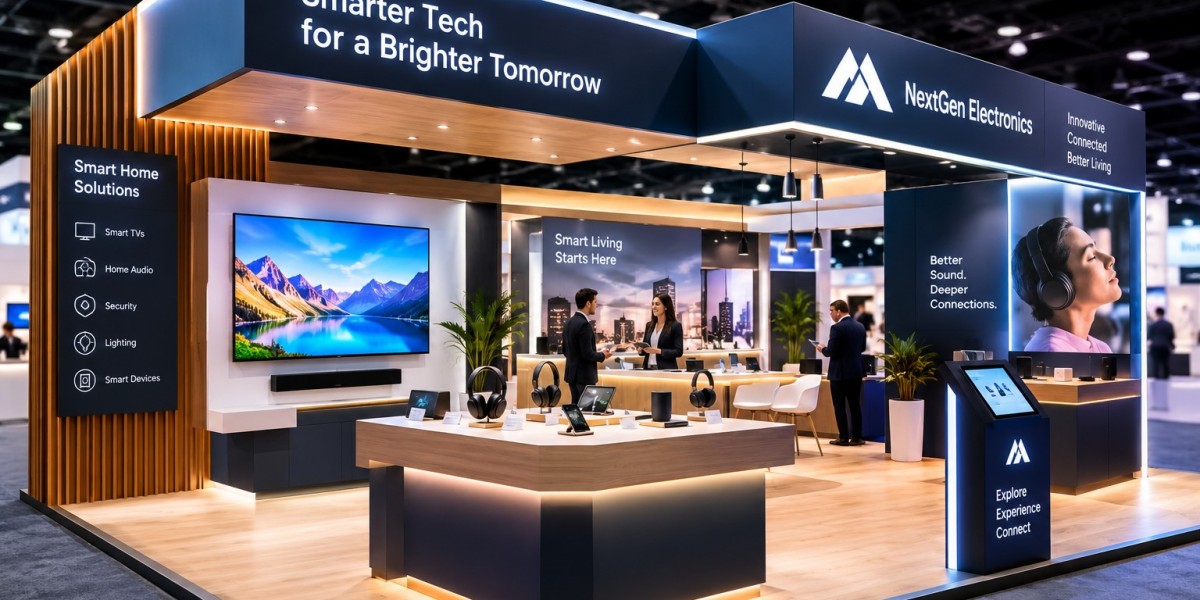

Smart home technology is changing how people manage lighting, security, entertainment, energy use, and everyday comfort. For brands exhibiting at consumer electronics trade shows, presenting these products effectively requires more than placing devices on display tables. Visitors need to see how connected technologies work together and how they can solve practical problems. Partnering with a Consumer electronics trade show exhibit builder can help companies create an engaging exhibition environment that demonstrates connected living through interactive experiences, realistic product setups, and clear communication. At events such as CEDIA Expo 2026, a thoughtfully planned smart home booth can help brands connect with integrators, installers, distributors, and other technology professionals.
Why Smart Home Demonstrations Matter at Trade Shows
Smart home products are often easier to understand when visitors see them operating in a realistic environment. A smart thermostat, connected light, security camera, or automated blind may have useful features individually, but the overall value becomes clearer when these devices work together.
A trade show booth provides an opportunity to demonstrate this connected experience. Instead of asking visitors to imagine how a system might function at home, exhibitors can let them interact with controls, observe automated responses, and explore different use cases.
These demonstrations can also help explain technical concepts such as device compatibility, automation routines, remote access, and system integration.
For brands, the objective should be to make technology understandable and memorable while creating opportunities for meaningful conversations with prospective buyers and partners.
Create a Realistic Smart Home Environment
One of the most effective ways to showcase smart home technology is to recreate a small section of a home within the exhibition booth.
This could include a living room setup with connected lighting, speakers, a television, automated blinds, and a central control interface. A separate area might demonstrate home security, while another could focus on energy management or climate control.
A realistic environment helps visitors understand how the products fit into everyday life. It also provides a natural setting for product demonstrations.
The booth does not need to replicate an entire house. A carefully designed living room, entertainment wall, or smart entryway may be sufficient to demonstrate the main benefits.
Keep the environment focused on the products being promoted. Excessive furniture, decorative accessories, and unrelated displays can distract visitors from the technology.
Demonstrate How Devices Work Together
Connectivity is a central feature of many smart home solutions. Visitors should be able to understand how individual devices communicate and work together within a broader system.
For example, a demonstration could show how a single command activates selected lights, adjusts the thermostat, and starts an entertainment system. Another demonstration might illustrate how a door sensor triggers a notification or activates a predefined lighting routine.
These practical examples help explain automation more clearly than technical specifications alone.
Exhibitors should also communicate which devices, platforms, and communication standards are supported. Compatibility can be a major consideration for system integrators and installers planning real-world projects.
If a demonstration uses a particular controller, application, or network configuration, make the setup clear so visitors understand what is required to achieve the same result.
Use Interactive Control Panels and Touchscreens
Interactive control panels allow visitors to experience smart home technology directly. Instead of watching a staff member operate every device, attendees can try controls themselves and observe the results.
A touchscreen might allow visitors to select lighting scenes, adjust room temperature, control blinds, or explore different security settings. A tablet-based interface could demonstrate how several connected devices are managed from one location.
Keep the interface simple and intuitive. Visitors should be able to complete an action without lengthy instructions.
Provide clear labels and ensure that the demonstration resets easily between users. Staff should remain nearby to answer questions and explain advanced features when needed.
Interactive controls can also help exhibitors identify which functions attract the most interest, providing useful feedback for future product presentations.
Highlight Smart Lighting and Automation
Smart lighting is an accessible way to demonstrate automation because visitors can immediately see the results of their actions.
A booth might feature different lighting scenes for relaxing, working, watching a film, or entertaining guests. Visitors could switch between scenes using a wall control, mobile application, voice interface, or centralized automation system.
Lighting demonstrations can also explain dimming, scheduling, color adjustment, occupancy-based controls, and integration with other devices, where supported.
Use lighting to improve the booth itself as well. Accent lighting can highlight products, while ambient lighting can create distinct demonstration areas.
However, lighting should remain comfortable and practical. Avoid effects that are too bright, distracting, or difficult to evaluate under exhibition conditions.
Showcase Smart Security Solutions
Home security is another important category within the smart home market. Exhibitors can demonstrate connected cameras, video doorbells, motion sensors, door and window sensors, smart locks, and monitoring interfaces.
A simulated entryway can help visitors understand how these devices work together. For example, a visitor might trigger a demonstration doorbell and see how the video feed appears on a display or control panel.
Security demonstrations should use a controlled environment and avoid exposing real private information. Any recorded footage, account details, or network information should be appropriate for public display.
Explain practical considerations such as installation requirements, connectivity, notifications, storage options, and compatibility with other supported devices.
For professional visitors, it can also be useful to demonstrate how the products fit into a larger security or home automation system.
Build an Immersive Home Entertainment Experience
Home entertainment technology can create an engaging focal point for a smart home booth. Connected televisions, projectors, surround sound systems, streaming devices, and automated lighting can demonstrate how technology creates a more integrated entertainment experience.
A small media room or entertainment wall can help visitors evaluate picture quality, audio performance, control options, and device integration.
Audio demonstrations require particular attention to the exhibition environment. Use headphones or a controlled listening zone where appropriate, and consider venue sound restrictions before planning loud demonstrations.
Make sure visitors can understand the product differences being presented. A guided demonstration might compare available picture settings, sound modes, or control methods.
For brands presenting integrated entertainment solutions, explain how the different components work together and what is required for installation.
Demonstrate Voice Control and Hands-Free Features
Voice control can make a smart home demonstration more interactive. Visitors may be able to issue supported commands to control lighting, adjust temperature, play media, or activate a predefined scene.
A demonstration should be prepared carefully because noisy exhibition halls can affect voice recognition. Use a suitable microphone and speaker arrangement, choose commands that work reliably, and have a manual control option available.
Explain which commands and functions are supported rather than implying that every device can respond to every request.
Privacy is also important. If voice assistants or microphones are active, make their operation clear and avoid collecting personal information from visitors.
A reliable demonstration helps visitors focus on the convenience of hands-free control instead of technical interruptions.
Explain Energy Management and Connected Climate Control
Smart thermostats, connected sensors, automated blinds, and energy monitoring systems can demonstrate how technology supports more informed control of a home environment.
A booth might show how temperature settings change according to a schedule or how sensors provide information about different rooms. An energy dashboard could display sample consumption data and explain how users monitor usage.
Use realistic scenarios rather than making unsupported claims about guaranteed energy savings. Actual results depend on factors such as the building, equipment, local climate, occupancy patterns, and user settings.
For professional audiences, explain the system's requirements and how it integrates with other supported products.
Clear demonstrations can help visitors understand the practical value of energy management without overwhelming them with technical details.
Use Digital Displays to Explain Complex Systems
Digital displays can support smart home demonstrations by explaining how devices connect, what each component does, and how users control the overall system.
A large screen might show a simplified diagram of a connected home. Smaller screens can present product specifications, installation information, application interfaces, and short instructional videos.
Animation can be particularly useful for explaining invisible processes such as communication between devices or automation routines.
Keep the content concise and readable. A visitor should be able to understand the main message even while standing in a busy exhibition aisle.
Where possible, provide access to more detailed technical information through QR codes or digital product documents. This allows interested visitors to explore specifications without overcrowding the booth with printed materials.
Organize the Booth Into Clear Technology Zones
A smart home exhibit can become confusing when lighting, security, entertainment, networking, and automation products are all displayed without a clear structure.
Organizing the booth into technology zones helps visitors navigate the experience. Each area should have a defined purpose and a clear connection to the overall brand message.
Possible zones include:
Smart lighting and automation.
Home security and access control.
Connected entertainment.
Climate control and energy management.
Centralized control and system integration.
These zones do not need to be separated by physical walls. Different display surfaces, signage, lighting treatments, and demonstration counters can establish distinct areas.
Provide enough room for visitors to gather around each demonstration without blocking the main route through the booth.
Make Product Compatibility Easy to Understand
Compatibility is an important consideration when selecting smart home products. Professional buyers and system integrators may need to understand which controllers, platforms, networks, applications, and devices work together.
A clear compatibility display can help visitors compare product options and understand the supported combinations.
Use accurate labels and diagrams to explain the system architecture. If certain features require additional hardware, a subscription, a specific network configuration, or a compatible controller, communicate that requirement clearly.
Avoid suggesting that products integrate seamlessly with every system unless that claim is supported.
Providing accurate information helps build trust and gives professional visitors the details they need to assess whether the technology fits their projects.
Prepare Reliable Demonstrations Before the Event
Smart home demonstrations often depend on multiple devices, networks, applications, and control systems. If one component fails, the entire demonstration may become difficult to follow.
Test every device and automation routine before the exhibition opens. Confirm that devices remain connected, control interfaces work, screens display the correct content, and demonstrations can be reset quickly.
Where possible, configure a dedicated demonstration network and avoid depending entirely on public venue Wi-Fi. Confirm venue rules and technical requirements before setting up network equipment.
Prepare backup demonstrations for essential features. Recorded videos, offline presentations, or alternative manual controls can help staff continue explaining a product if a live system stops working.
A pre-event checklist should cover power, network connectivity, software updates, device pairing, security settings, and staff responsibilities.
Design for Safety, Accessibility, and Visitor Comfort
A smart home booth should be welcoming and easy to navigate. Keep pathways clear, manage cables securely, and position demonstration devices so visitors can approach them comfortably.
Screens should be readable, labels should be clear, and important controls should be accessible to as many visitors as practical.
If visitors are invited to operate physical controls, ensure that the devices are securely installed and that the demonstration area can handle repeated use.
Consider the environment as well. Excessive sound, rapidly changing lighting, crowded demonstration stations, or overly complicated interactions may make the booth uncomfortable for some visitors.
An organized, accessible design helps more attendees explore the products at their own pace.
Train Staff to Explain Smart Home Technology
Knowledgeable booth staff can turn a product demonstration into a valuable business conversation.
Staff should understand the purpose of each demonstration, the products involved, supported integrations, common installation questions, and the main benefits for different audiences.
They should be prepared to explain the same system in different ways. A homeowner may want to understand convenience and ease of use, while a system integrator may need technical information about compatibility, configuration, and installation.
Practice common demonstrations before the event and assign clear responsibilities for welcoming visitors, operating equipment, answering technical questions, and arranging follow-up meetings.
Staff should also know how to respond when a feature is not supported or when a question requires additional technical confirmation. Honest, accurate answers help establish credibility.
Capture Leads and Continue Conversations After the Show
A successful smart home exhibition should create opportunities that continue after the event.
Use an appropriate lead capture process to record contact details, visitor interests, and agreed follow-up actions. Depending on event rules, this could include badge scanning, digital forms, QR codes, or scheduled appointments.
Record the specific products or integrations a visitor asked about. A distributor may want commercial information, while an installer may request technical documentation or a product training session.
After the event, send relevant information and follow up on the next steps discussed at the booth. Avoid sending the same generic message to every contact.
Handle personal information responsibly and follow applicable privacy requirements. A clear, organized follow-up process helps turn exhibition conversations into longer-term business relationships.
How to Choose the Right Exhibit Partner for CEDIA Expo 2026
Choosing an exhibit partner involves more than reviewing attractive design concepts. Brands should look for a provider that understands product demonstrations, technical infrastructure, visitor flow, and the practical requirements of technology-focused events.
Review the partner's previous work and discuss how the proposed design will support smart home demonstrations. Ask how they will accommodate electrical equipment, screens, control panels, networking, storage, and meeting areas.
Clarify responsibilities for design, fabrication, transport, installation, dismantling, and on-site support. It is also useful to establish how changes, equipment testing, and technical issues will be handled.
For CEDIA Expo 2026, planning should begin early enough to coordinate products, venue requirements, demonstration scripts, and staff preparation.
A well-chosen exhibit partner can help create a booth that presents connected technology clearly and makes the experience useful for both technical and commercial visitors.
Conclusion
Showcasing smart home technology at a consumer electronics trade show requires a clear demonstration strategy. Realistic home environments, interactive controls, connected lighting, security displays, entertainment systems, and energy management demonstrations can help visitors understand how different technologies work together.
The strongest booths balance innovation with reliability. Products should be easy to test, compatibility should be explained accurately, and demonstrations should work consistently throughout the event. Clear signage, knowledgeable staff, accessible layouts, and organized lead capture can further improve the visitor experience.
By planning around real use cases and the needs of professional buyers, brands can make their technology easier to understand and remember. Partnering with a suitable Consumer electronics trade show exhibit builder can help transform a smart home concept into an engaging exhibition environment that supports product discovery, meaningful conversations, and future business opportunities.